
Computer Network Topology
A computer network topology is a method used to connect one computer to another. The structure or network used to connect one computer to another can use cables or wireless (wireless).
Functions of Computer Network Topology
A computer network topology serves to determine how each computer or host in a computer network can communicate with one another.
Types of Computer Network Topologies with Their Advantages and Disadvantages
1. Ring Topology
Topology ring or often called a ring topology, is a type of network topology used to connect one computer to another in a circular series shaped like a ring. Generally, this type of ring network topology only uses a LAN card so that each computer is connected. Ring Topology Diagram:
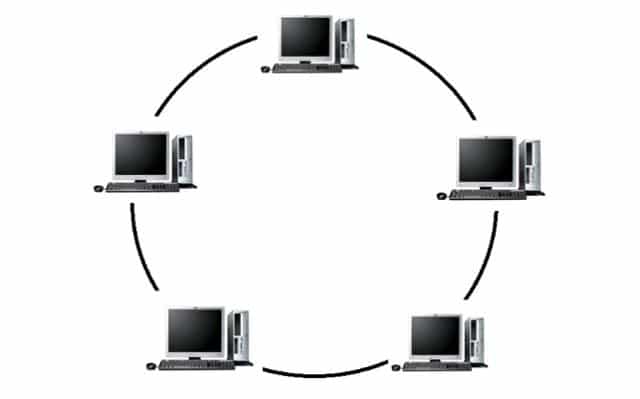
Advantages Advantages of Ring Topology include:
- Low installation cost.
- Fairly good connection performance.
- The installation and configuration process is fairly easy.
- Easy to implement.
Disadvantages Advantages of Ring Topology include:
- If a problem occurs, troubleshooting this network is fairly complicated.
- Very prone to data collisions.
- If one connection has a problem, the connection on the network will be cut off.
2. Bus Topology
Bus topology is a simpler network topology. Generally, this network topology is used in cable-based network installations with coaxial. Bus topology uses cable coaxial along the length of client nodes and connectors. The types of connectors used are BNC, Terminator, and TBNC. Bus Topology Diagram:

Advantages Advantages of Bus Topology include:
- Adding new clients or workstations is easy.
- Easy to use and very simple.
- Low installation cost because little cable is used.
Disadvantages Advantages of Bus Topology include:
- Data collisions occur frequently.
- Sending and receiving data is less efficient.
- Older bus topologies are hard to expand.
- If there is a problem with the cable, for example if it is cut, the computers workstation will be disrupted.
3. Mesh Topology
A mesh topology is a topology that can be used for many routes. This network topology uses a single cable so that data transmission is faster without passing through a hub or switch. Mesh Topology Diagram:

Advantages Advantages of Mesh Topology include:
- The bandwidth limit is quite large.
- Data security in this topology is very good.
- There are no data collisions because there are very many data transmission paths.
Disadvantages Advantages of Mesh Topology include:
- A large amount of cable is required.
- The installation cost of a mesh topology is very high because it uses a lot of cable.
- The installation is very complicated.
4. Star Topology
A star topology is a star-shaped network topology that generally uses a hub or switch to connect clients. This computer network topology is the most widely used today because it has many advantages. Star Topology Diagram:

Advantages Star Topology, among others:
- This topology network continues to run well even if one client computer has a problem.
- The level of data security in this topology is fairly good.
- Users can detect network problems more easily.
- More flexible.
Disadvantages Star Topology, among others:
- This topology is relatively expensive because it uses quite a lot of cable.
- All computers in this network will have problems if the hub or switch fails.
- Highly dependent on the central terminal.
5. Tree Topology
A tree topology is a combination of bus and star topologies. Generally, a tree topology is used to interconnect hierarchies with different centers. Tree Topology Diagram:

Advantages Tree Topology, among others:
- It can easily be expanded into a wider network topology.
- The arrangement of this topology is hierarchically centralized, which makes data management easier.
Disadvantages Tree Topology, among others:
- Has slow network performance.
- It uses a very large amount of cable, so installation costs are high.
- Cable backbone is the center of this topology.
- If the upper computer has a problem, the lower computers will also have problems.
6. Peer to Peer Topology
A peer to peer topology is a very simple network topology because it connects only 2 computers. Generally, a peer to peer topology uses just one cable to connect the two computers so that they can share data with each other. Peer to Peer Topology Diagram:

Advantages Peer to Peer Topology, among others:
- Very low installation cost.
- Easy installation process.
- Every computer can act as a server or a client.
Disadvantages Peer to Peer Topology, among others:
- Very difficult to expand.
- Security in this topology is often problematic.
- The troubleshooting process is rather complicated.
7. Linear Topology
A linear topology, often called a sequential bus topology, generally uses only one main cable to connect each connection point on every computer. Linear Topology Diagram:

Advantages Linear Topology, among others:
- Easy to expand.
- Uses little cable.
- The layout of a linear topology is simple and easy.
- This topology does not require central control.
Disadvantages Linear Topology, among others:
- Data traffic density is quite high.
- Data security is not guaranteed.
8. Hybrid Topology
A hybrid topology is a combination of several different topologies that form a new network. In other words, if two or more different topologies are connected in one network, that network topology forms a hybrid topology. Hybrid Topology Diagram:

Advantages Hybrid Topology, among others:
- Flexible.
- Adding other connections to this topology is very easy.
Disadvantages Hybrid Topology, among others:
- The installation and configuration process is fairly complicated.
- Managing a hybrid topology is very difficult.
- The cost of building this topology is quite high.
Well, that is more or less the explanation of Computer Network Topologies. Let's get to know our study program better Bachelor of Telecommunication Engineering and visit the official website Telkom University Jakarta Campus yes!
Written by Dzul Rahman
